Guide · Energy
The best home energy monitor for Home Assistant
Ever wondered which appliance is quietly eating your power bill? A whole-home energy monitor clips onto the wires where power enters your house and turns it into numbers: watts right now, kilowatt-hours over the day. Feed those into Home Assistant's built-in Energy dashboard and you can watch your house breathe.
There are four realistic ways to do it. The big question is whether your data takes a detour through somebody's cloud.
The quick pick
| Option | Talks to Home Assistant | Best for |
|---|---|---|
| Sense | Official integration, via Sense's cloud | People who want Sense's app too |
| Emporia Vue | No core integration; community add-ons | Fans of Emporia's app and wider kit |
| Shelly EM | Built-in integration, local | Local data with no DIY |
| ESPHome + CT clamp | Native ESPHome, local | Tinkerers who want zero cloud |
Sense: polished, but cloud-only
Sense is known for spotting individual appliances from your main feed. Home Assistant's Sense integration logs in to your Sense account, and its connection type is listed as cloud polling. You get live usage and solar production every 60 seconds, daily to yearly totals (including to-grid and from-grid) every 5 minutes, and a sensor for each device Sense detects. If the internet drops, so does your data. Sense on Amazon
Emporia: big app, no core integration
Emporia sells the Vue monitor alongside smart plugs and a home battery, all run from its app. Home Assistant has no built-in Emporia integration; community projects fill the gap. Pick it if you want Emporia's whole kit and don't mind the cloud. Emporia Vue on Amazon
Shelly EM: the local middle path
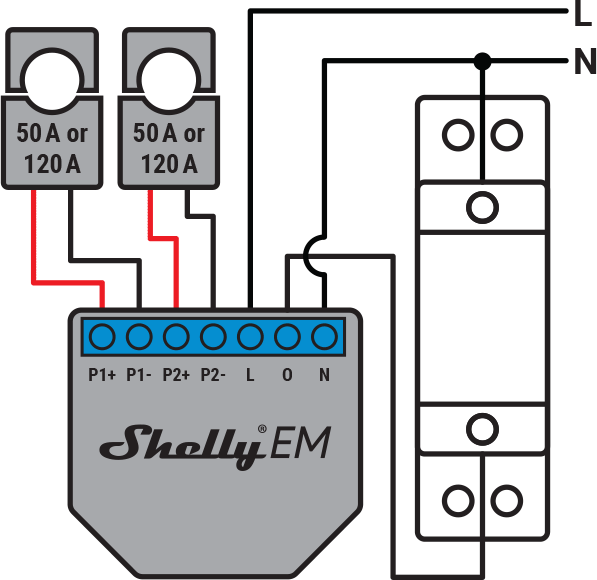
The Shelly EM is a small box with two clamp channels: say, your main feed plus one big circuit like the AC. Home Assistant's built-in Shelly integration talks to it on your network, no cloud needed. (More in our Shelly and Home Assistant guide.) Shelly EM on Amazon
ESPHome: build it, own it
The fully local route: an ESP32 board plus a CT clamp, the little donut that snaps around a wire and measures current without cutting anything. ESPHome's CT Clamp sensor turns that into a reading in Home Assistant. Want more accuracy? ESPHome also supports dedicated metering chips such as the ATM90E32. No account, no cloud, just a weekend of calibration. CT clamps on Amazon

New to ESPHome? Start with our ESPHome guide.
Two things to know before you buy
- Watts aren't kilowatt-hours. The Energy dashboard's totals need kWh. If your monitor only reports watts, add a Riemann sum integral helper to convert it. (The dashboard can now show power sensors alongside energy ones, too.)
- Clamps mean panel work. The clamps don't cut wires, but you're still opening a live electrical panel. If that's not your thing, hire an electrician.
Solar at home? Sense's integration exposes production and grid import/export directly; with the others, add your inverter's integration as the solar source.
Picking by situation
- You already have Sense or Emporia hardware. Use the official Sense integration, or the vendor's cloud app for Emporia, and feed the Energy dashboard from it. Just know the data path runs through their cloud.
- You want local readings with no DIY. The Shelly EM with Home Assistant's built-in Shelly integration is the shortest route to a consumer-unit monitor that answers to your network.
- You want zero dependencies and don't mind a wiring project. An ESPHome CT-clamp or metering-chip build is the only option in this list with no vendor cloud anywhere in the chain.
- You have solar. Any of the above that reports production feeds the Energy dashboard's Sources; Sense's integration even exposes To Grid, From Grid and Net Production sensors directly.
Gotchas we'd flag before you order
Cloud paths are structural, not optional extras. Home Assistant's own integration documentation for Sense states the data flows through Sense's cloud with no local API documented; Emporia's platform is mobile-app-centric per its site. If your Energy dashboard should keep working when the internet is down, that constraint picks the hardware for you — Shelly or ESPHome.
Watts are not kilowatt-hours. Plan for the Riemann sum integral step from day one; a monitor that reports watts only still works, it just needs the conversion sensor configured before the dashboard shows totals.
Clamp work means panel work. The Shelly EM installs in the consumer unit per Shelly's documented wiring diagram. CT clamps clip around conductors without cutting, but panel access is still live-panel territory — follow your local electrical rules.
Vendor web pages shift. Sense's product page currently redirects and 404s at some old URLs — content lives on sense.com — and several Emporia deep URLs return 404. Verify links when you buy, not just when you read a guide.
- Primary sources
- Home Assistant Energy integration; Home Assistant Sense integration; Emporia Energy; Shelly EM knowledge base; ESPHome CT Clamp component; sense.com
As an Amazon Associate, HA News earns from qualifying purchases.